Warehouse layout software for material-handling equipment providers
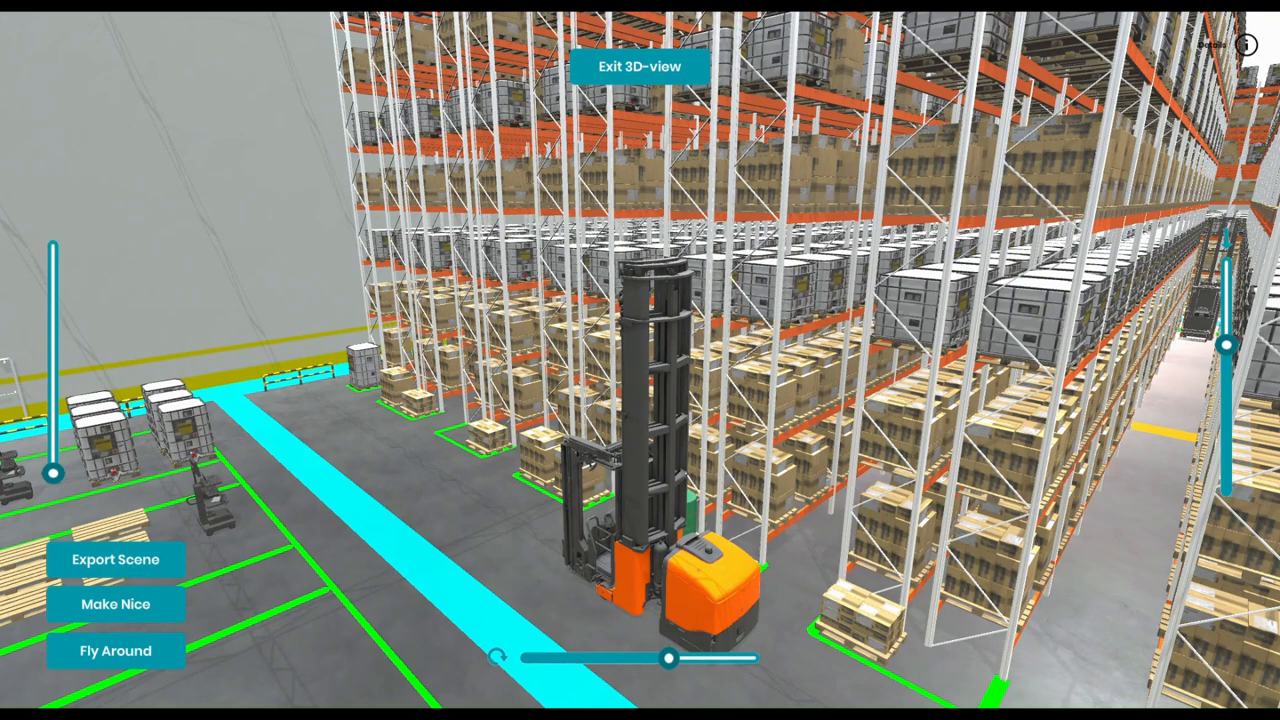
Warehouse Builder is warehouse layout software for material-handling equipment providers. Your racks, trucks and load carriers go into a library your sales team builds with, at their real dimensions, so a buyer sees your equipment standing in their own building before they order. The library grows as your range does.
Why is it hard for buyers to picture your equipment?
Usually because they meet it in a brochure, a spec sheet or a showroom, far from their own aisles. They have to imagine how a rack run or a truck fits their building, and that's where doubts about fit, flow and space tend to start.
How do equipment providers use Warehouse Builder?
Your sales team lays out the buyer's site with your equipment in it.
Share your equipment data. The CAD files and specs you already hold for your racks, trucks and load carriers.
We build your library. RealityMatters turns them into layout-ready assets with their real dimensions.
Lay out the buyer's site. Your sales team picks the building's shape, marks out the zones and places your equipment.
Check it fits. Each asset carries its dimensions, so Warehouse Builder flags an aisle that's too narrow.
Show it. Walk it in 3D on screen, open it on a tablet or put the buyer in a headset.
What does an equipment provider get?
Your equipment, shown at its real dimensions inside the buyer's own layout instead of on a spec sheet. A library your whole sales team draws from, so every layout uses current products. And it keeps growing: new equipment can be added as you launch it, without starting over.
How does it sit with your CAD and engineering?
It replaces the sketch stage, not engineering. Your existing CAD files are the source for the library, and your engineers keep their own tools for detailed design. Warehouse Builder exports a 3D model rather than a CAD file, so engineering opens the agreed layout and builds the detail from there.
Does it work for greenfield and brownfield warehouse layouts?
Yes. On a blank greenfield site, your sales team shows how your equipment shapes a new building from the start. In an existing brownfield building, they draw the current layout, swap in your racks or trucks, and let the buyer see the change before anything's ordered.
Questions equipment providers ask
Can we add our own racks, trucks and load carriers?
Yes. That's how the library is meant to grow. You share the CAD files and specs you already hold, or put us in touch with your suppliers, and RealityMatters builds each item into your library with its real dimensions. From then on, your sales team places it in any layout like any other asset.
What do you need from us to build our equipment library?
The CAD files you already have for each product, and the specs that go with them: heights, widths and the dimensions that matter for fit. If some of that sits with your suppliers, an introduction works too. We'll tell you early if a file needs more before it can become an asset.
Does the library have to be complete before we start?
No. Warehouse Builder ships with standard racks, trucks, pallets, boxes and bins, so your team can build layouts from day one. Your own equipment is added over time, starting with the products you sell most, and the library keeps growing as your range changes. It's a project that scales with you.
Can Warehouse Builder show automated storage and handling equipment?
Not today. The library covers racks, trucks, pallets, boxes, bins and similar equipment. Automated storage and handling equipment is on the roadmap, and we know it matters as supply chains change. If it's central to what you sell, join the early-access list and tell us which equipment families you need first.
Does Warehouse Builder replace our CAD software?
No. Your sales team uses Warehouse Builder to show the buyer a layout early, and your engineers keep doing detailed design in their own CAD tools. Your CAD files also feed the library, so the two work from the same equipment data.
Which products go in the library first?
Tell the Layout Desk which products you'd want in the library first.